Music Engraving: SCORE, Sibelius, Finale, Dorico
Despite the pretentiousness of the term, "music engraving" is simply the process of typesetting music on the computer—"typing it in" so that it looks pretty.
The term originally referred to the process of carving musical notes, lines, and objects into metal plates—literally engraving—but even though everybody uses computers now, the term stuck. Though more opaque than "typesetting," most serious music typesetters prefer to call themselves "engravers" because it reflects the skill and craft that is required to professionally set pieces on the computer.
Unlike typing an essay into Microsoft Word, the process of reading a composer's manuscript and creating a finished score is far from simple. The musical engraver is expected both to standardize notation (this can include everything from minor beaming changes to changing time signatures, respelling chords, changing the distribution of instruments on the staves...) and help the composer eliminate any ambiguities that may exist on the page ("Is that flute line for both flutes or just one? Is that trumpet note still muted? Strings are arco again in measure 143?"). The goal, of course, is a perfectly formatted score and parts, ready for easy performance with a minimum of rehearsal.
(A good set of score and parts really can reduce rehearsal time: simple things like courtesy accidentals where the performer is likely to second-guess the composer's intentions make a huge difference, and obviously cues will help an orchestral performer avoid getting lost while sight-reading a piece. In these days of ever-decreasing rehearsal time, every minute is worth saving!)
Often, the engraver works with a publishing house to ensure the score fits with its style-sheet. Far more than just "typing the piece into the computer," a music engraver is a true designer and graphic artist.
I engrave scores for composers or arrangers, producing high-quality output with a (relatively obsessive) eye for detail. For quality of printed output, nothing beats the SCORE Music Publishing System, used around the world when it is important a score be instantly understandable with a minimum of thought. However, I am also an expert user of Sibelius and Dorico (and a begrudging user of Finale), which can all provide other advantages (MIDI playback, for example).
My rates vary depending on the complexity of the music, legibility of the manuscript or score, and time pressure. Scores are generally charged by the finished page, or, sometimes, by the hour; orchestra parts are almost always charged by the finished page. Contact me at jeffrey@jeffreygrossman.com to discuss your project and get a quote. I enjoy working on everything from simple pieces for soloists to full-length operas, and the process of getting to know the individual styles of composers is an added bonus for me. As a practicing professional musician, I bring my performing experience to your scores.
Here's a small packet of samples [10 pages, 1.1 MB], demonstrating a range of idioms including:
- Solo instrumental
- Chamber music (score and parts)
- Unmeasured harpsichord music
- Choral music
- Traditional hymns
- Orchestral score
- Orchestral part
If you are interested in seeing more work in a particular style or idiom, I am happy to provide you with more examples of my work in both Sibelius and SCORE.
I've worked with many publishers and performing organizations including:
- Alfred Publishing
- Boosey & Hawkes
- C. F. Peters
- Cambridge Early Music Project
- Church Publishing, Inc.
- Harvard University Press
- Harvard-Radcliffe Orchestra
- Holden Choruses, Harvard University (Harvard Glee Club, Harvard-Radcliffe Collegium Musicum and Collegium Musicum Chamber Singers, Radcliffe Choral Society)
- Kalmus Music
- Maelos Music
- The Metropolian Opera
- The Memorial Church, Harvard University (Harvard University Choir)
- Nashua Symphony
- Pittsburgh Symphony
- Sonary Publications
- Wehr's Music House
- Woodbury Music Co.
- Zimbel Press
typesetting the music of composers, arrangers, and editors:
- John Adams
- Leroy Anderson
- J. S. Bach
- Mahlon Balderston
- Keith Barnard
- Ludwig van Beethoven
- William Billings
- Elliott Carter
- Jeremiah Clark
- Carson Cooman
- Aaron Copland
- Michael Daugherty
- Zosha Di Castri
- Emma Lou Diemer
- Justin Dello Joio
- Edward Elgar
- Nicolas Flagello
- Alan Fletcher
- Carlisle Floyd
- Frederick Frahm
- Hernando Franco
- George Gershwin
- Orlando Gibbons
- Allen Orton Gibbs
- Peter J. Gomes
- Howard Hanson
- Walter S. Hartley
- Josef Haydn
- John Ireland
- David Clark Isele
- Josquin des Prez
- Stephen Kemp
- Meyer Kupferman
- Kevin Leong
- Jameson Marvin
- Robert Moran
- Felix Mendelssohn
- Johannes Ockeghem
- Robert Page
- Giovanni Pierluigi da Palestrina
- Charles Hubert Hastings Perry
- Henry Purcell
- Wieslaw V. Rentowski
- Arnold Rosner
- Godwin Sadoh
- Sean Shepherd
- Jean Sibelius
- Bernard Scherr
- John Stainer
- Charles Villiers Stanford
- Heinrich Schütz
- Arthur Seymour Sullivan
- Thomas Tallis
- Douglas Townsend
- Roy Travis
- Joseph Turrin
- Patricia Van Ness
- Ralph Vaughan Williams
- Tomás Luis de Victoria
- Gwyneth Walker
- Charles Wuorinen
- James Yannatos
- Man-Ching "Donald" Yu
- and others...
Why SCORE Is So Great, or, Why I Switched
by Jeffrey Grossman
I have always done some computer engraving when the occasion arose: it appeals to my impulse (mild compulsion?) to organize and bring order to messy situations. I began in Finale, but in 2002 switched to Sibelius the moment someone proved to me that it could produce professional output. (In fact, I believe Sibelius's output is generally superior to Finale's, just because I find Sibelius's font more pleasing to the eye.)
However, I eventually grew less and less satisfied with Sibelius. I began to feel like I was constantly fighting the program to do what I wanted: slur a certain way, organize the notes exactly according to my internal image, etc. Every thing you click in Sibelius affects other objects—this is supposed to be "intelligent" and "helpful," and sometimes it is. Many times, though, you notice a note needs just a little more space, and you want to just move it over, but oops! there goes the whole measure, reflowing onto another line, messing up your careful line placement. Let's not even talk about the default horizontal positioning system in Sibelius, which is frighteningly stupid. Well, okay, let's talk about it. Every object gets space, even if it doesn't need it. Let's see an example. (It's best if you just stare at the two examples for a few moments; the same music engraved in Sibelius and... something else.) 1
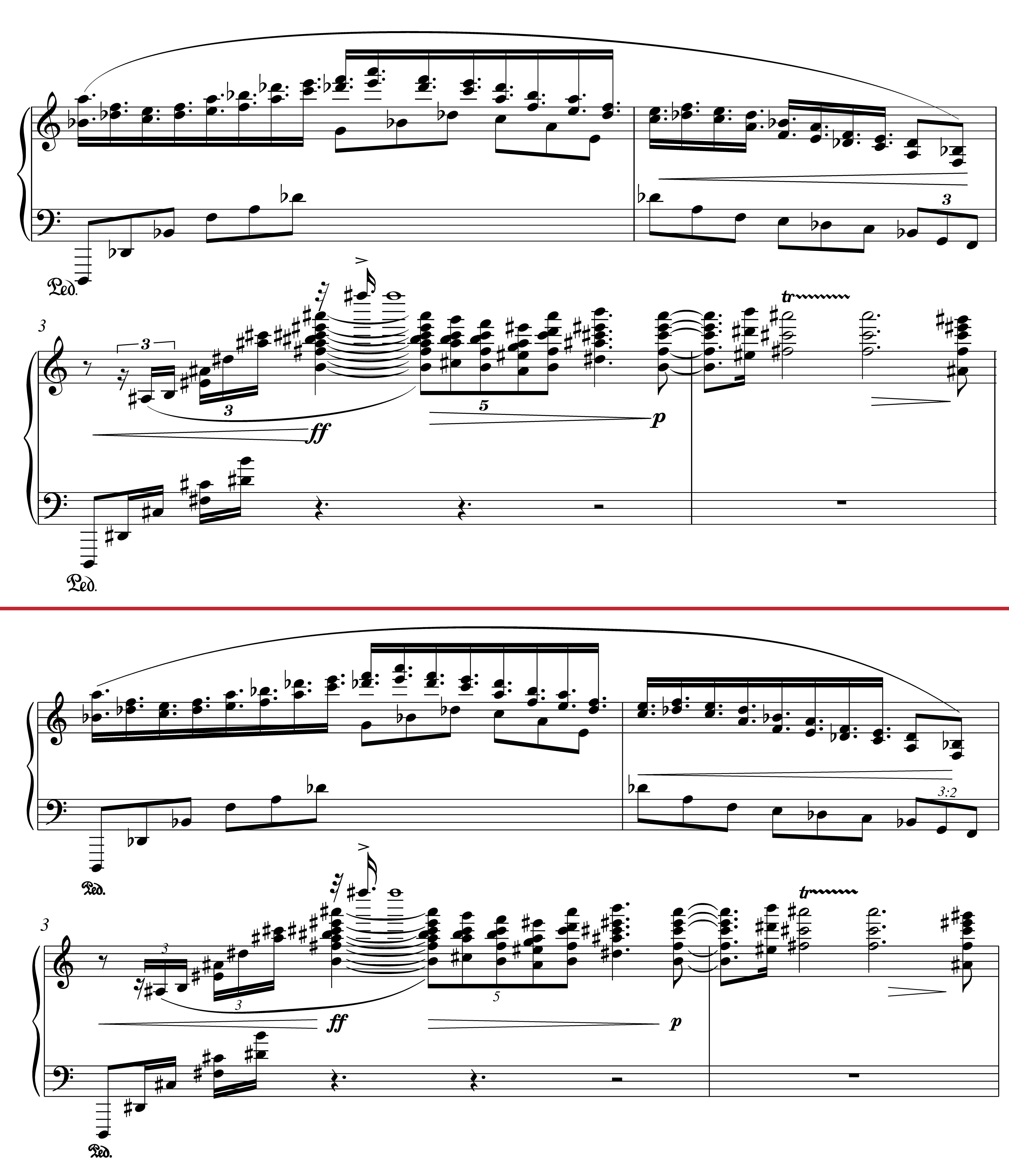
Can you guess which one is Sibelius? (Look at the note spacing.) What is Sibelius (the upper example) doing?! Is there any reason that the dotted sixteenth-notes in the upper line need to be so unevenly positioned? How about the quintuplet in m. 3? 2
I don't really know why Sibelius does this so badly—the program dates back to 1986, so there's been plenty of time to fix it—, but I hope you'll agree that SCORE's engraving is clearer, thanks to the superior algorithms behind SCORE's spacing. This means that rhythms are recognizable much more easily and naturally, which is especially noticeable with tuplet cross-rhythms seen in the example, but can be just as important in more rhythmically simple music.
SCORE is the grandfather of Finale and Sibelius. Begun in 1967 (!) at Stanford, it was the first program to produce professional output (in the 1970s) and although its development has more or less ceased, it remains my program of choice for professional-quality output. (It is not for the faint of heart, and I wouldn't recommend anybody begin learning it at this point, but I'm extremely glad I jumped on the bandwagon when I did.)
SCORE's philosophy about spacing is that objects shouldn't necessarily make all the music move unless space is needed to accommodate them. So an accidental added to the middle of a line should just get added in, not destroy the even spacing of even notes. This is noticeable even in the simplest of triplet lines, so imagine the cumulative results of thousands of these lazy Sibelius calculations...
SCORE's basic note font is also—in my opinion—more clear and somehow more "solid" than Sibelius's or Finale's. Look at the example above. Sibelius's noteheads are too round and its beams somehow gangly. SCORE's darkness and solidity allows for slightly smaller staff sizes with improved readability, meaning the music fits into fewer pages with no loss in performance ease. (Yes, I'm just going to declare aesthetic judgements as fact. It's the internet!)
On the technical side, SCORE allows absolutely unparalleled, complete control over every item on the musical page. For example, while Sibelius and Finale allow a few editing points for a slur, you can manipulate all 19 of SCORE's slur parameters by eye with the mouse, numerically with the keyboard, or even group edit all the slurs in a document in sophisticated ways, allowing complete consistency throughout a score. Though this appears to take longer than the point-and-click "modern" input method, in the end it saves endless amounts of time, because the engraver can avoid fighting the program (Sibelius or Finale) to make the slur look perfect. When I see a slur colliding with an accidental, I can just adjust exactly the part of the slur that needs to be changed (increasing its curvature slightly, moving its center in minute ways, manually adjusting the shouldering values, etc.) instead of the endless click-and-drag annoyance we have all gotten accustomed to. And the "group editing" I mentioned becomes more important when you figure out exactly how you want something to look. I think ties should align with the note in a really specific way: in SCORE, I run a program I wrote that makes all ties in a piece of music look exactly right. In Sibelius, I have to manually page through the score and use the mouse to adjust each tie, by eye.
The other part of SCORE that seems at first counter-intuitive is that nothing changes unless you want it to. For example, if I took our example above and I changed one note in Sibelius, the rest of the line would move. (Any note!) In SCORE, on the other hand, absolutely nothing would change except the note I touched, in exactly the way I wanted. I could turn the first left hand note of m. 3 into a whole note, and nothing would move. It seems ridiculous at first, but the implication is that I always know exactly what my actions will accomplish.
This feels at first like a lot of extra work. And admittedly, in some cases, it may mean some extra time. But consider a situation like this:
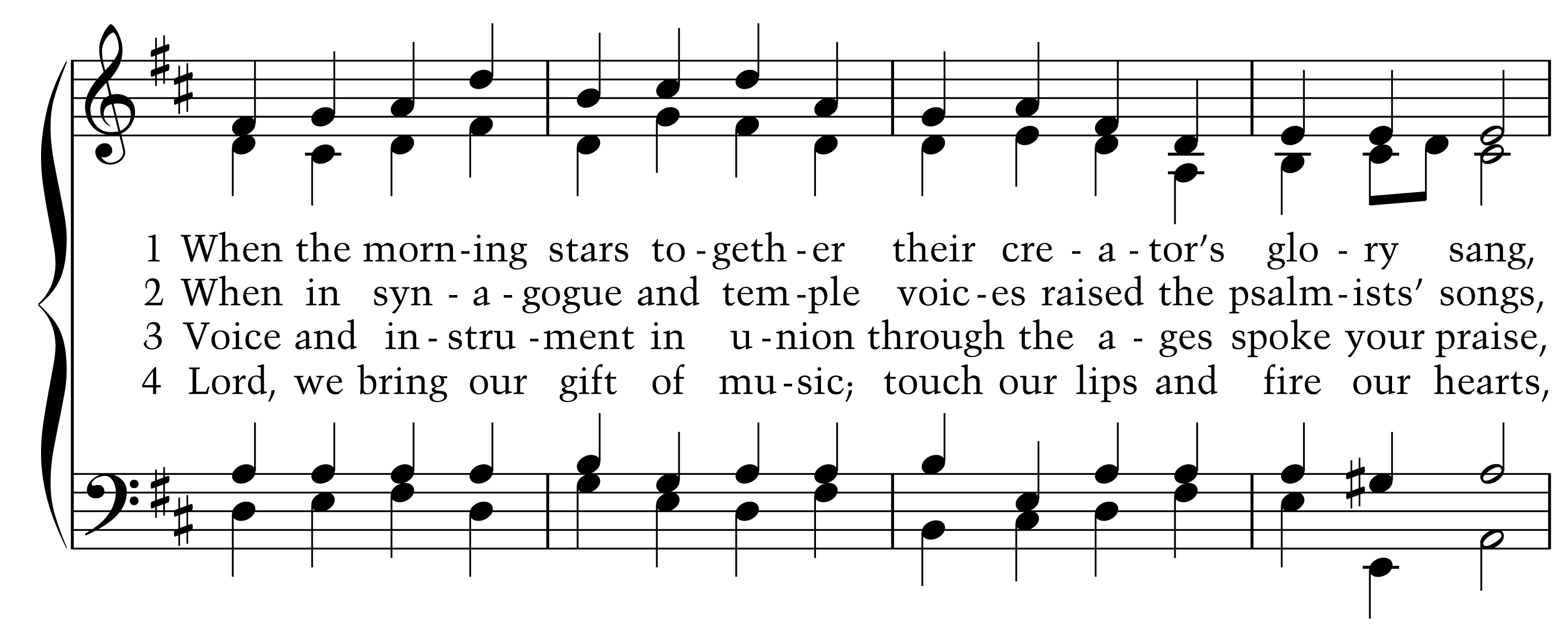
This was done in Sibelius, and pretty much every word and hyphen here was pushed or pulled manually in some way to make the line readable and still fit into such a small space. If I noticed that there were a wrong note here (I don't think there is) and changed, for example, the first tenor B to a C, the entire line would be subtly messed up: extra space created there, notes moved later in the line (and often even earlier notes), words out of alignment, hyphens completely awful... it is frustrating and time-consuming to have to re-do that sort of manual work, and you are never convinced at the end that it's quite as good as what you had in the beginning.
Imagine that work for, say, 371 hymns.
And remember that in SCORE, I could have made the one necessary correction and nothing would have moved around it, unless I explicitly wanted to respace the line.
At the end of the day, engraving is about printed output. MIDI playback can be very useful and electronic music is great, but personally, as a typesetter and a musician, I want to quickly and correctly read a printed musical score for performance or study. Of course, with time and effort, Sibelius and Finale are also capable of professional output, but it takes a lot more work than people realize. The advantages of their graphical, mouse-driven interfaces become disadvantages as soon as you realize you will need to manually adjust every tie of a 200-page orchestra work so that they look right. SCORE is not simple or fast, but the nearly limitless flexibility it provides makes it the best choice for consistently professional output in a reasonable amount of time.
Postscript: Years after writing the above "essay," I was told that all the links to the SCORE website (www.scoremus.com) are broken. Indeed, after the death of its creator Leland Smith, SCORE has died as well. I still have major projects in the program, and it will continue to work as long as DOS can be emulated on a modern computer, but it's safe to say it is not the future. I divide the rest of my projects between Sibelius and Dorico. Dorico has a long way to go, but considering it's only been in development for a handful of years, it is a promising future engraving solution.
Postscript 2: In 2020, I started moving to Dorico for more and more work; I think it has the most promise and I believe in the quality of the output. That said, it has a ton of limitations, bugs, and quirks, and even now (early 2021) I decided to engrave an orchestra score in SCORE instead. Dorico suffers from the same issue as Sibelius in that it tries to "help" make the music "correct," so it moves items, it tweaks things, and sometimes when you move an item in one place, something elsewhere moves... this is frustrating when you're trying to adjust every object to perfection. And the horizontal spacing algorithm is still not quite as good as what SCORE can achieve. Don't even get me started on vertical spacing.
That said, I plan on making the orchestra parts in Dorico, even while the score is made in SCORE. Dorico makes beautiful-looking cues with almost no work, and the ability to quickly lay out a part graphically (picking perfect page turns, changing your mind, moving things around) is a huge improvement in the workflow. So, at least for the moment, I'm stuck in a weird limbo of programs! But that's okay. The future of music engraving is bright.
- The original is here but it is badly pixelated, so both versions here are my reengravings, first in Sibelius, then SCORE. I can't remember how I found it, but it's clearly from an older version of Sibelius, and badly pixellated. ↩
- There are still some mistakes in these examples, like missing courtesy accidentals and the trill line in measure 4, which is totally unnecessary, but they were in the original, so I basically left them in.↩
